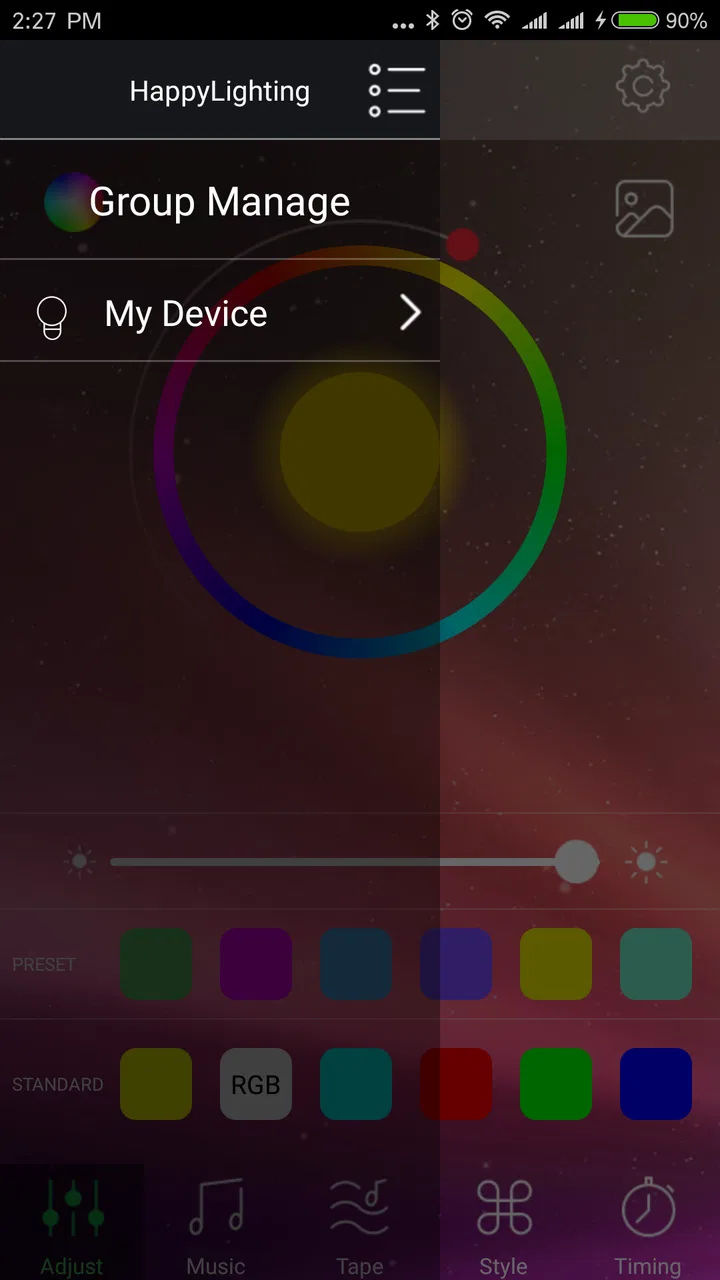
HappyLighting
- 3.3
- Rating
- 5.00M
- Installs
- Free
- Price

 Analysis by App-foxy
I approached HappyLighting as a practical personalization app rather than a complete smart-home platform. Its purpose is straightforward: it lets a phone communicate with a compatible Bluetooth lamp, giving you a more convenient way to adjust the light than reaching for a small controller or using the lamp’s physical buttons. That simplicity is both its appeal and its main limitation.
In everyday use, I found the experience most useful when the lamp was already nearby and ready to pair. The app is free, aimed at Everyone, and comes from qh-tek. It has been available since Aug 30, 2018, and the current version is 1.6.48. Those details matter because this is not a brand-new experiment; it is an established utility that many people have tried, even though its average rating sits at 3.4 from around 15 thousand ratings and about 2 thousand written reviews.
The central question is not whether the app offers an enormous collection of smart-home tools. It does not need to. The better question is whether it makes a compatible Bluetooth lamp easier to control in the moments when you actually want to use it. My answer is cautiously positive, provided your lamp belongs to the group the app can communicate with and you are comfortable with a fairly focused control experience.
You May Also Like

 Blood Strike: 2.5 Anniversary
Blood Strike’s Loadouts Turn Every Drop Into a Tactical Gamble
A close look at Blood Strike’s custom loadouts: how fast access to signature weapons reshapes its battle royale rhythm, rewards preparation, and narrows the gap between fights.

 Pandora - Music & Podcasts
Pandora’s Music Is Easy to Start, but Harder to Recover
Pandora’s strength is its low-effort path from a seed to a station. Its weak spot is how much confidence it asks you to place in connection, setup, and quiet recovery.

 8 Ball Pool
 Is Built on Rivalries, Rematches, and Routine
A close look at the rivalries, rematches, shared routines, and unanswered safety questions that turn a quick pool match into a persistent mobile community.

 Samsung Music
’s Quiet Strength Is Playing What You Already Own
Its reach comes less from spectacle than from dependable access to a personal library. That simplicity is both the app’s strongest retention engine and its ceiling.

 AccuWeather: Weather Radar
AccuWeather Review: A Quick, Clear Forecast for Everyday Decisions
For everyday plans, the best forecast is the one you can understand quickly. AccuWeather makes rain timing, radar, and local conditions easy to act on, with a few trade-offs.

 Hill Climb Racing
Why Hill Climb Racing Still Turns Crashes Into One More Run
A tiny car, a bumpy hill and one more upgrade: Hill Climb Racing keeps resurfacing because its simple chaos makes every near-miss feel personal.
More From Our News Desk



How the app feels when you need a quick lighting change
The first thing I pay attention to with a Bluetooth accessory app is the time between opening it and getting to the control I need. HappyLighting is built around that direct relationship with a lamp, so the experience feels lighter than using a broad smart-home application filled with unrelated devices. When the connection is already available, the path from phone to lamp is naturally short.
That does not mean every session feels instant. Bluetooth control depends on the lamp being powered, close enough to communicate, and available to the phone. If one of those conditions is wrong, the app can seem slow even when the application itself is not doing anything complicated. In my experience, this is the important distinction: a delay may come from reconnecting to the accessory rather than from loading a large interface.
I recommend opening the app after checking the simple things first. Make sure the lamp is switched on, keep the phone in the same room, and avoid assuming that a lamp which worked yesterday is still actively connected today. This small routine saves more time than repeatedly tapping controls while the accessory is unavailable. It is especially helpful for people who use the lamp only occasionally and forget whether its physical power switch was left on.
The app’s focused design also makes it easier to understand what it is for. I would not install it expecting a dashboard for every device in the home. I would install it because I have a Bluetooth lamp that needs a phone-based control method. That narrow purpose helps the app feel manageable, but it also means the value depends heavily on the exact lamp and the quality of the connection.
What happens during a normal evening
A realistic use case is a bedroom or living-room lamp used at different times of day. I might switch it on while reading, change the lighting when the room becomes darker, and then turn it off before leaving. With a reliable connection, controlling the lamp from the phone is more comfortable than standing up or searching for a separate remote.
The benefit becomes clearer when the lamp is placed somewhere awkward. A light behind a sofa, on a high shelf, or beside a bed can be annoying to operate manually. In those situations, a phone is already within reach, so the app removes a small but repeated inconvenience. This is not a dramatic transformation, but repeated small conveniences are exactly where a utility like this earns its place.
I also see a useful distinction between occasional adjustment and constant control. If you change the lamp once or twice during an evening, the app can feel perfectly adequate. If you expect to keep making rapid changes while hosting a party, filming content, or testing many lighting combinations, any reconnecting or inconsistent response becomes much more noticeable.
Performance when the lamp is used repeatedly
Heavy use exposes the practical trade-offs more clearly than a quick test. Repeatedly opening the app, switching between lighting adjustments, and moving around the room puts more pressure on the Bluetooth relationship than a single command. I would not judge the app only by its first successful connection; I would also watch whether it remains comfortable after several interactions.
For a small personal lamp, the workload is modest. The phone is not being asked to stream media or manage a complicated network of appliances. That gives HappyLighting a sensible role as a lightweight controller. Still, the app cannot remove the limits of Bluetooth. Distance, obstacles, the lamp’s own electronics, and the phone’s connection state can all influence how dependable the controls feel.
One practical tip is to avoid testing the app from the farthest corner of your home and then concluding that it is unusable. Start next to the lamp, establish a connection, and gradually test the position from which you normally control it. This separates a pairing problem from a range problem. It also gives you a realistic idea of whether the app fits your room rather than relying on an ideal setup.
Another useful habit is to keep the lamp’s power arrangement consistent. If the lamp is regularly disconnected at the wall, the app will naturally have less opportunity to control it. A phone application cannot operate a lamp that has no power, and this sounds obvious until the same mistake happens repeatedly in daily use. For a bedside light, leaving the lamp powered and using phone control is usually a more coherent workflow than cutting power after every use.
During periods of frequent adjustment, I would also avoid treating the phone as a perfect replacement for every physical control. A physical switch remains useful when the phone is charging, unavailable, or not cooperating with Bluetooth. The best setup is often a combination: use the app for convenient changes and keep the lamp’s ordinary power method available as a fallback.
Stability, reconnection, and recovering from a failed session
Reliability with an accessory app is less about never seeing a problem and more about how quickly you can recover. HappyLighting’s usefulness depends on a chain of simple conditions: the correct lamp, power to the lamp, a nearby phone, and a working Bluetooth connection. When those line up, the app’s focused purpose works in its favor. When they do not, troubleshooting becomes part of the experience.
If the lamp does not respond, I would use a clear recovery order instead of repeating the same command. First, check whether the lamp is powered. Next, move closer and give the connection a moment. Then close and reopen the app if the session appears stuck. If that still fails, toggling Bluetooth on the phone or restarting the lamp can be more productive than continuing to press the same on-screen control.
This approach is especially important for less technical users. The app itself may look simple, but Bluetooth accessories can fail in ways that are not obvious. A lamp may appear normal while not being available for control, or the phone may still show Bluetooth as enabled while the particular connection needs to be re-established. A short recovery checklist makes the product feel less mysterious.
I would not describe this as a zero-maintenance experience. It is closer to a convenient remote that sometimes needs the same basic attention as other wireless accessories. That may be acceptable for a decorative lamp used in one room. It is less appealing if you need guaranteed control for a business, a public display, or any setting where a missed command would be disruptive.
The app’s long presence on the platform and its user base of over 5 million installs suggest that the basic concept has found a substantial audience. At the same time, the middling average rating is a useful reminder not to assume that every lamp-and-phone combination will feel equally smooth. The app can be perfectly practical for one setup and frustrating for another because the accessory and connection environment matter so much.
Older phones and the limits of the setup
One notable point is the minimum operating-system requirement: Android 4.3 or newer. That makes the app accessible to older Android phones, at least from a compatibility perspective, which is helpful if you want to dedicate an older device to lamp control. A spare phone on a bedside table can be a sensible arrangement, especially when the main phone is often carried elsewhere.
However, an older supported operating system does not guarantee that every old phone will deliver the same experience. Bluetooth hardware, background behavior, battery condition, and the phone manufacturer’s software can all affect practical use. I would treat the minimum requirement as an entry point, not a promise of identical performance across every compatible device.
There is also a trade-off in using an older phone as a permanent controller. It may be convenient because it stays near the lamp, but it can become another device to keep charged and updated. If the lamp is used only occasionally, opening the app on your everyday phone may be simpler. If the lamp is part of a routine, a dedicated device can reduce the friction of finding the right phone each time.
People with newer phones should not assume that more powerful hardware will solve every connection issue. A faster processor may make app navigation feel comfortable, but it cannot extend the lamp’s Bluetooth range or fix an accessory that is not powered. The most important constraint is the relationship between the phone and the lamp, not raw phone speed.
I would also be cautious about expecting the app to behave like a Wi-Fi lighting system. Bluetooth is a local technology, so the natural use case is controlling a nearby lamp. If you want to operate lights while away from home, coordinate several rooms from one central interface, or connect lighting with a wider smart-home routine, a dedicated Wi-Fi ecosystem may be a better fit.
Where it beats ordinary alternatives—and where it does not
The usual alternatives are a physical switch, a small remote supplied with the lamp, or a broader smart-home app. HappyLighting’s advantage over a physical switch is convenience: you can control a nearby lamp without reaching for it. Compared with a separate remote, the phone is one less object to keep track of, assuming it is already in your hand.
Its advantage over a general smart-home platform is focus. You do not need to build a whole connected-home setup just to control one Bluetooth lamp. For someone who wants a simple phone-based option, that can be preferable to adopting a larger ecosystem with more setup and more devices than necessary.
The disadvantages are just as clear. A physical switch is dependable when the lamp has power and does not require pairing. A dedicated remote may be faster for repeated adjustments and can be easier for guests or children to understand. A broader smart-home system is usually the better choice for people who want remote access, multiple rooms, voice control, or automation across different brands.
There is also a human factor. If several people use the same lamp, relying on one person’s phone can create unnecessary friction. A remote or wall switch is shared by default. HappyLighting makes the most sense when one primary user controls the lamp, or when everyone who needs access is comfortable using the same app and Bluetooth arrangement.
For renters, students, or anyone experimenting with a single decorative light, the free price removes a major barrier. You can try the app without committing to a paid control platform. But “free” does not make it universally suitable. The lamp must still be compatible, and the convenience disappears if you dislike keeping Bluetooth active or repeatedly dealing with reconnection.
Who should use it and who should choose something else
I would recommend HappyLighting to someone who already owns a compatible Bluetooth lamp and wants a direct phone controller. It is particularly suitable for a bedroom lamp, a desk light, or a decorative fixture that is physically inconvenient to reach. It can also work well for people who prefer using one familiar device instead of keeping a separate remote nearby.
The app is less convincing for someone shopping for a complete lighting system from scratch. In that situation, I would first choose the lighting ecosystem based on the features and connectivity I need, then use the manufacturer’s recommended controller. A single Bluetooth app is not the right foundation if your plans include several rooms, remote access, or complex automation.
I would also suggest skipping it if your lamp is already easy to control with a reliable physical switch and you rarely adjust it. Installing an app for a problem you do not actually have adds another step without delivering much value. The strongest reason to use it is repeated convenience, not novelty.
For families, consider who will need access before making it the main control method. If a child, guest, or older relative needs to turn the lamp on, a physical control may remain more practical. The app is a personal convenience tool, not automatically the best shared interface.
My practical setup advice
I would begin by placing the phone close to the powered lamp and completing the initial connection before trying to control it from a distance. This confirms that the basic pairing relationship works. After that, test the exact chair, bed, or desk where you expect to use the app. That simple two-stage check prevents confusion between setup trouble and ordinary range limits.
Keep the app’s role narrow and predictable. Use it for the lamp it is meant to control rather than expecting it to replace every lighting tool in the home. If you have a physical switch, leave it available. A fallback is not a sign that the app failed; it is sensible planning for a wireless accessory.
If the response becomes inconsistent, change one condition at a time. Move closer, confirm power, restart the lamp, or restart the Bluetooth session rather than changing everything simultaneously. This makes it easier to identify whether the problem is distance, power, or the phone’s connection state. It also reduces the temptation to blame the app before checking the accessory.
Finally, think about where the phone will be when the lamp is most often used. A controller that works well from the sofa may be less useful if the phone is normally charging in another room. The best experience comes from matching the app to a real routine, not from judging it as a technical demonstration.
My performance verdict
HappyLighting is a focused, free personalization app that can make a compatible Bluetooth lamp more convenient to use. I like its straightforward purpose and the fact that it does not require a full smart-home commitment. For a nearby lamp used by one main person, it can be a sensible alternative to a separate remote.
My reservations come from the nature of Bluetooth control rather than from the idea itself. Connection range, lamp power, phone compatibility, and reconnection behavior all influence the experience. The app feels most dependable when the setup is simple and local; it becomes less attractive when you expect whole-home access, shared control, or flawless operation under heavy use.
With qh-tek as the developer, a current version of 1.6.48, and support reaching back to Android 4.3, it remains approachable for a wide range of Android users. Its Everyone rating also makes it easy to consider for ordinary household use. Still, the average rating of 3.4 tells me to keep expectations realistic rather than treating it as a polished replacement for every kind of lighting controller.
My recommendation is conditional but clear: try it if you already have the right Bluetooth lamp and want convenient nearby control. Keep a physical fallback, test the connection in your normal room, and choose a broader smart-home option if your needs go beyond one local light. In that specific role, HappyLighting can be useful; outside it, the limitations become hard to ignore.
FAQs for HappyLighting
01What is HappyLighting and what does it do?
HappyLighting is a versatile app designed to control smart LED lights. It offers users the ability to customize lighting settings, including color, brightness, and patterns. The app can sync lights with music, creating an immersive experience. It’s compatible with various smart light brands, making it a popular choice for home automation enthusiasts.
02How do I connect my smart lights to the HappyLighting app?
To connect your smart lights to HappyLighting, first ensure your lights are compatible with the app. Then, download and install the app on your Android or iOS device. Open the app, go to the ‘Add Device’ section, and follow the instructions to pair your lights via Bluetooth or Wi-Fi, depending on your setup.
03Is HappyLighting compatible with all smart lighting systems?
While HappyLighting supports a wide range of popular smart lighting brands, it may not be compatible with every system. It’s important to check the compatibility list on the app’s official website or app store description. Generally, the app works well with most Bluetooth-enabled LED lights and some Wi-Fi-based systems.
04Are there any subscription fees or in-app purchases in HappyLighting?
HappyLighting is free to download and use, with no mandatory subscription fees. However, the app may offer in-app purchases for additional features or enhanced functionalities. Users can choose to purchase these extras, but the core features are accessible without any payment, providing a cost-effective solution for users.
05What are the main pros and cons of using HappyLighting?
Pros of HappyLighting include its user-friendly interface, extensive customization options, and music sync feature. It’s also compatible with a variety of smart lighting systems. However, some users report connectivity issues, especially with certain Wi-Fi setups, and there might be occasional bugs that can affect performance. Regular updates often address these issues.
Pros
- User-friendly interface for easy navigation.
- Wide variety of lighting effects available.
- Customizable color patterns for creativity.
- Syncs with music for dynamic lighting shows.
- Compatible with multiple smart devices.
Cons
- Limited features in the free version.
- May drain battery quickly on mobile.
- Occasional connectivity issues reported.
- Requires a strong internet connection.
- Some features can be complex to set up.

HappyLighting
Gallery